Icon of program: WinSleep

WinSleep for Windows

  • Trial version
  • 4.9
    1
  • 245
  • V1.6.6.0

WinSleep: A Paid-for Windows Utility Tool

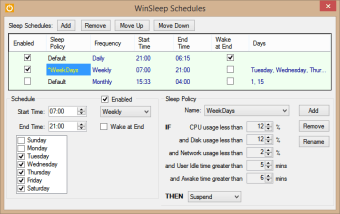
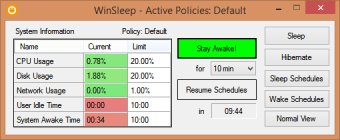
WinSleep is a paid-for Windows utility that endeavours to keep your machine asleep as much as possible when it's not being actively used. This helps reduce electricity consumption, and prolong your computer components' lifespan. Winsleep boasts a 30-day free trial before the paywall kicks in.

Optimise Your Computer's Up-time

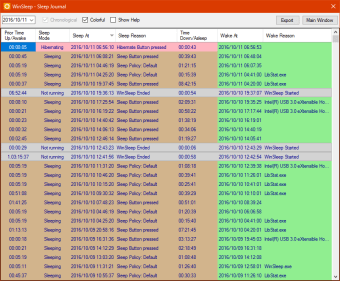
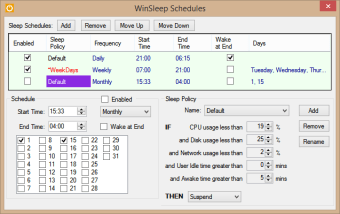
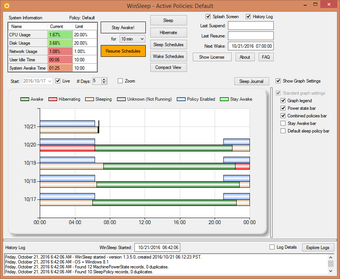
WinSleep is a utility tool that ensures your computer stays asleep when it isn't busy, against schedules that you determine. The tool provides you with a detailed breakdown and graph that depicts when your machine was awake, hibernating or asleep. You also get information on when and why your computer awakened, plus usage percentages on a component by component basis. The functionality offered by this tool lends itself to reduced running costs in terms of electricity, as well as extending the life of your machine's integral components.

In Summary

If you're interested in reducing your computer's power consumption or potentially benefiting from increased component lifespan, then you'll want your machine to sleep during periods of inactivity as much as possible. A tool like WinSleep can benefit in achieving this goal, whilst providing you a detailed log of when your computer is running and for what purpose, even in your absence.
  • Pros

    • Define custom sleep schedules
    • Reduces electricity consumption
    • Breaks down usage percentages
    • Can be remotely monitored
  • Cons

    • Doesn't support earlier Windows versions
    • No help documentation
    • Remote monitoring is a second download
    • Blocks essential updates
 0/7

App specs

Program available in other languages


Icon of program: WinSleep

WinSleep for PC

  • Trial version
  • 4.9
    1
  • 245
  • V1.6.6.0

User reviews about WinSleep

4.9

1 reviews

Add review

Main reviews for you

  • Anonymous user

    Handy app to keep PC asleep.. Very handy app to keep your PC asleep! Also shows you just what is going on with sleep/wake periods over several weeks. Awesome free monitor program lets you see it just as at the local machine, too.

More

You may also like

Explore Apps

Latest articles

Laws concerning the use of this software vary from country to country. We do not encourage or condone the use of this program if it is in violation of these laws.
Softonic

Is WinSleep safe?

100/100

Score result: Clean

This file passed a comprehensive security scan using VirusTotal technology. It is safe to download.

  • Virus free
  • Spyware free
  • Malware free
  • Verified by Security Partners

    VirusTotal logo

Scan Info

Last scan
Friday, September 26, 2025
Scan provider
VirusTotal · Full report

File Integrity

File
WinSleepSetup.msi
SHA256
88355e8226c97b2004b915b807fcb28a2c59103135458452a798796004499e36
SHA1
7b2a87c41ef81713fa74dd1fd6f20ffdc2a0bf43

Softonic security commitment

WinSleep has been thoroughly scanned by our advanced security systems and verified by industry-leading partners. This file comes from the official developer and has passed all our security checks, showing no signs of viruses, malware, or spyware. For more information, visit our Security and Trust Center